永久免费!现在可为 Excel Compare Text Compare 的对比结果生成链接,分享或嵌入你的网站。

对比 两列数据

重复值、唯一值、缺失项,即时呈现。无需 VLOOKUP。
100% FreeBrowser-OnlyNo UploadNo FormulasInstant Results

How to Compare Two Columns in Excel Online

Upload two Excel files, select the columns you need, and get a clear visual diff in seconds.

Step 1

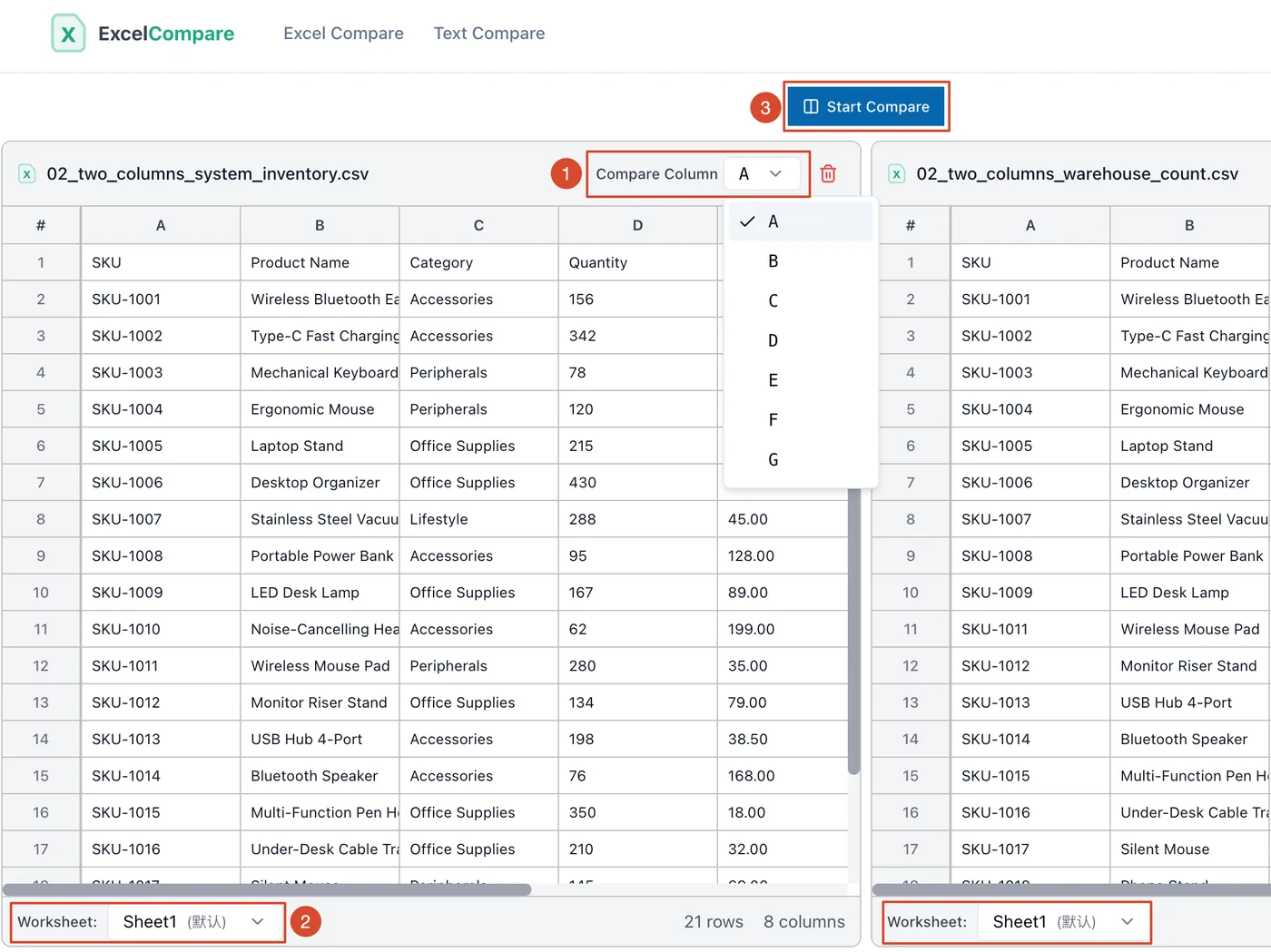
Upload Your Files and Select Columns

Upload two Excel files, switch to the right sheet in each, select one column per file, and click Compare.
Step 2

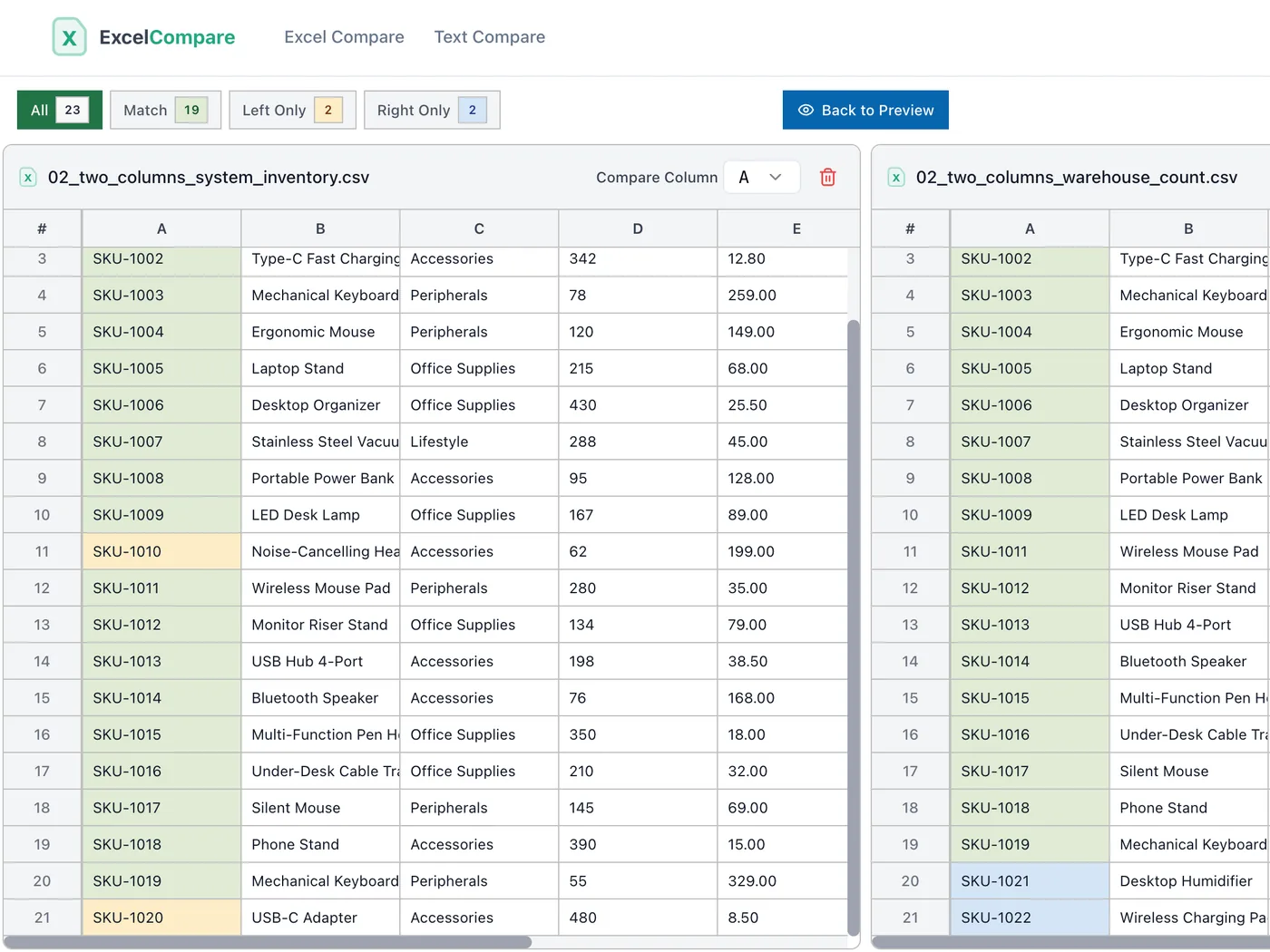
Review Color-Coded Results

Matching cells are green, left-only values are yellow, right-only values are blue. Use the filter tabs to switch views instantly.
Step 3

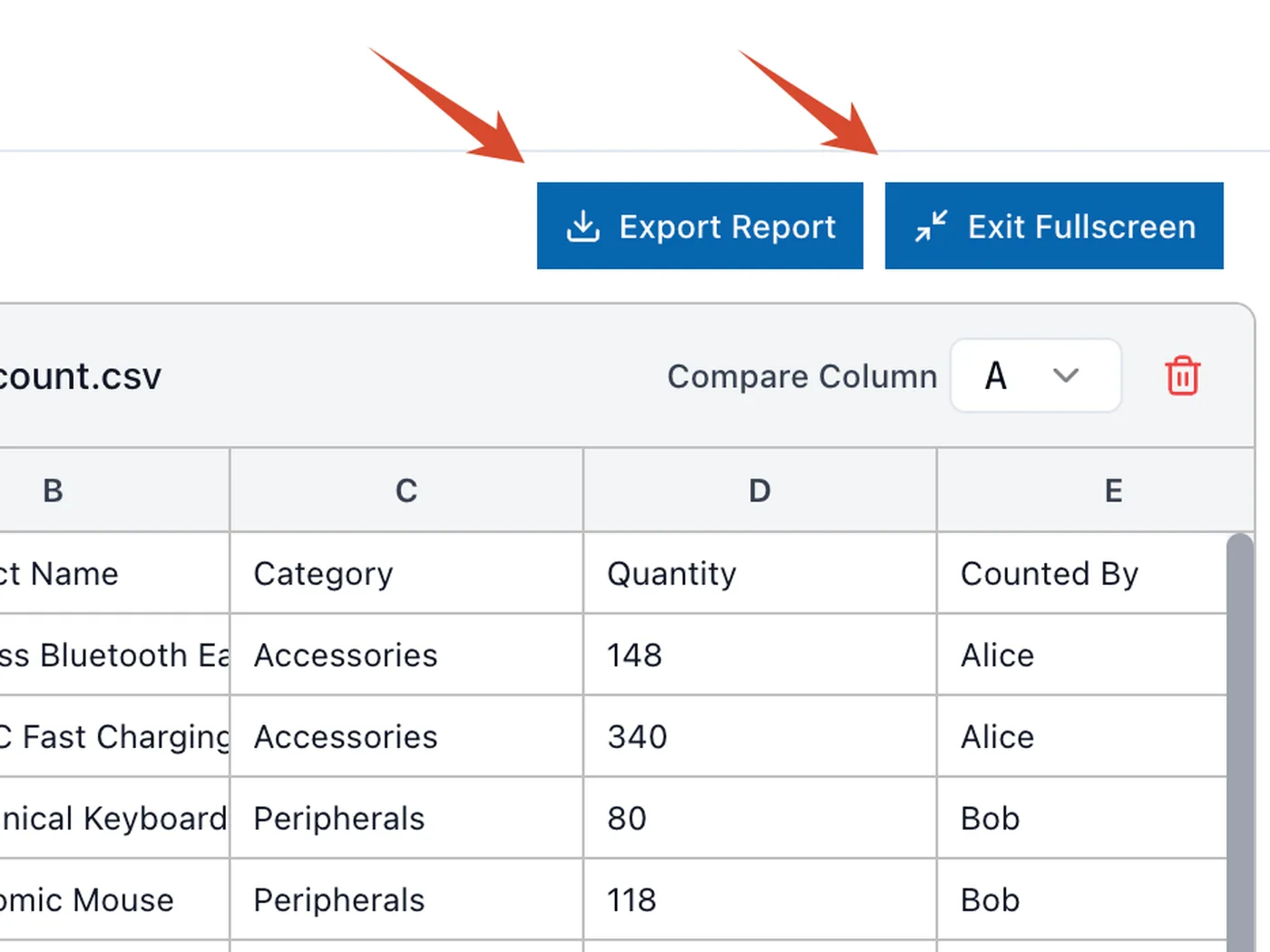
Export and Share

Export an HTML file with all highlights and filters intact. Shareable links with custom expiration are coming soon.
Upload Excel files and select columns to compare two columns in Excel online
Highlighted differences when comparing two columns in Excel with color-coded results
Fullscreen view and export comparison results when comparing two columns in Excel

Top Use Cases to Compare Two Columns Efficiently

Simplify data reconciliation for Marketing, HR, and Finance.

Email Marketing Cleanup

Don't risk spam complaints by emailing people who opted out. Instead of struggling with complex filters, use ExcelCompare to compare two columns—your fresh leads versus your "Unsubscribe" list. We instantly highlight the duplicates, allowing you to generate a clean, compliant mailing list in seconds without writing a single VLOOKUP formula.

Event & Training Tracking

Need to know who missed the mandatory workshop or webinar? Upload your full "Registration" list and the "Checked-In" list. When you compare two columns for unique values, our tool isolates the names found in the registration list but missing from check-ins. You get an immediate, accurate list of absentees for targeted follow-ups.

Monthly Financial Reconciliation

Stop eyeballing thousands of rows to find missing transactions. Whether you are matching bank statements to ledgers or physical inventory to system records, simply compare two columns of Transaction IDs or SKUs. ExcelCompare automatically detects the discrepancies between the two datasets, making your month-end reconciliation process faster and error-free.

将文件上传至 ExcelCompare,选择要比对的两列,工具立刻以绿色标出重复值、以红色标出独有值。全程无需编写 VLOOKUP、COUNTIF 或 INDEX-MATCH 等任何公式,操作简单直观。
可以,这正是本工具的核心能力之一。分别上传两个 .xlsx 或 .csv 文件,各自选择一列,系统自动对齐数据,同时标出匹配项、重复值和缺失条目,无需手动合并文件。
"交集"展示两列共同存在的值,即重复项。"仅 A 列有"显示 B 列中缺少的条目。"仅 B 列有"显示 A 列中没有的新增项。三种视图组合即可全面掌握两个数据集的差异全貌。
可以。ExcelCompare 使用智能对齐算法,即便两列数据完全打乱顺序,也能准确匹配对应值。上传前无需手动排序或整理数据,节省大量预处理时间。
对大多数场景来说,是的。Excel 条件格式在数据移动或排列改变时容易出错,而 ExcelCompare 能自动处理结构性变化,且支持跨两个独立文件对比,不受限于同一工作表内的两列。
上传文件后选择"仅 A 列有"视图,ExcelCompare 会自动筛选出第一列中在第二列找不到匹配的所有条目。非常适合核查退订名单、会议缺席人员或账单中的漏记交易。
有影响。ExcelCompare 的所有对比均严格区分大小写,"Alice"和"alice"会被判定为不同的值。如果数据源的大小写格式不统一,建议在上传前先将相关列的大小写统一处理。
可以。ExcelCompare 将每个单元格视为原始文本字符串进行比对。"SKU-101 "(末尾含空格)与"SKU-101"会被判定为不同,确保你不会漏掉任何因数据录入习惯不一致导致的细微差异。
ExcelCompare 针对大数据量做了专项优化,处理数万行数据效率依然很高。对比计算全程在浏览器本地运行,数据完全私密。处理超大列表时关闭多余标签页有助于进一步提速。
如果需要对整个表格文件进行并排对比,并配合同步滚动逐行审查所有内容,请使用 Excel 文件对比工具,它专为完整版本的文件差异对比而设计。
如果数据带有订单号、员工编号等唯一标识字段,推荐使用 数据对账工具。它按关键字列配对而非按行位置匹配,能精准反映每条记录的差异,不受排列顺序影响。
可以。支持直接导出对比结果,导出内容与网页视图效果完全一致。也可以生成分享链接发给同事或嵌入自己的网站,还可以设置链接过期时间。注意:使用分享链接功能需同意 ExcelCompare 保存你的对比数据。