Compare Two Excel Files Online
Three Ways to Compare Excel Files
Three specialized modes to handle any spreadsheet comparison task — from version tracking to data reconciliation.
Visual Full Sheet Comparison
Synchronized Scrolling
Scroll both sheets simultaneously in any direction to track changes in place.
Color-Coded Differences
Modified cells, added rows, and deleted rows are each highlighted in distinct colors.
Version-to-Version Clarity
Instantly see what changed between two versions of the same spreadsheet.
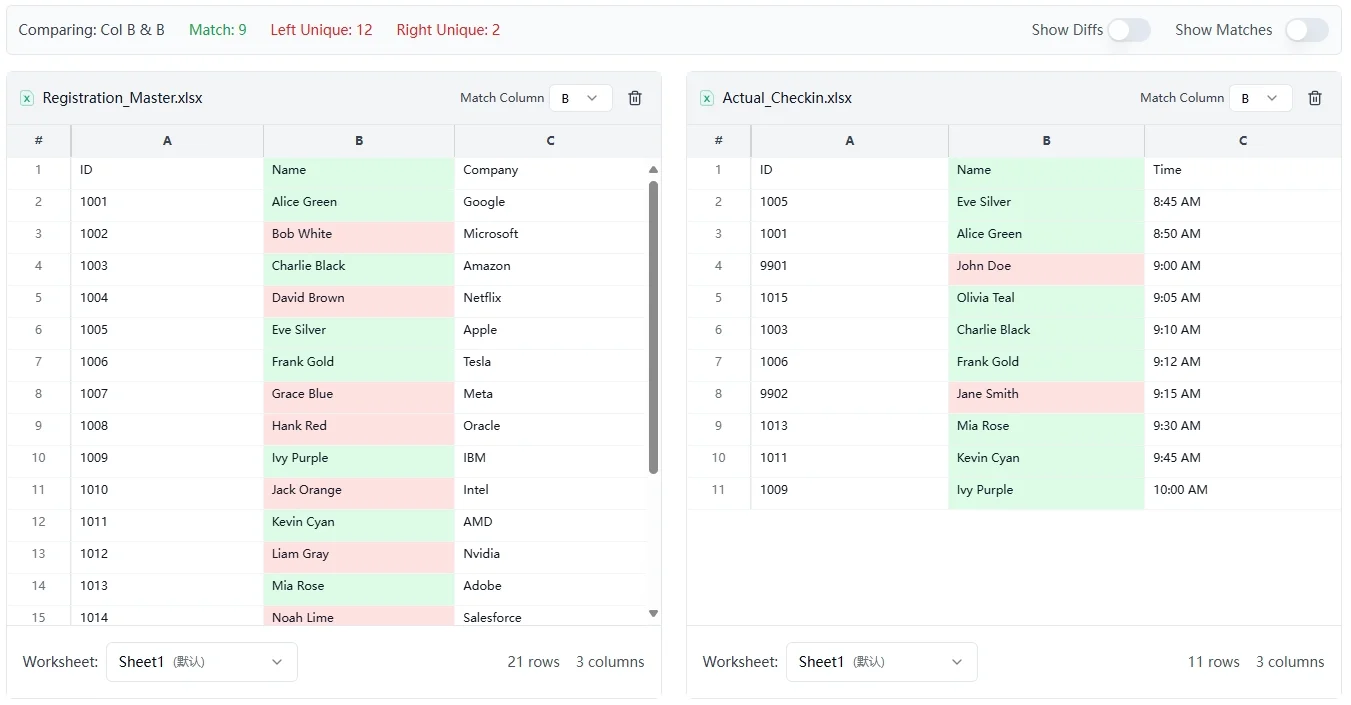
Instant Column-Level Comparison
Intersection Detection
Instantly identify values that appear in both columns.
Unique Value Highlighting
See which entries exist only on the left side or only on the right.
Clean, Focused Results
No row-by-row noise, just a clear set comparison between any two lists.
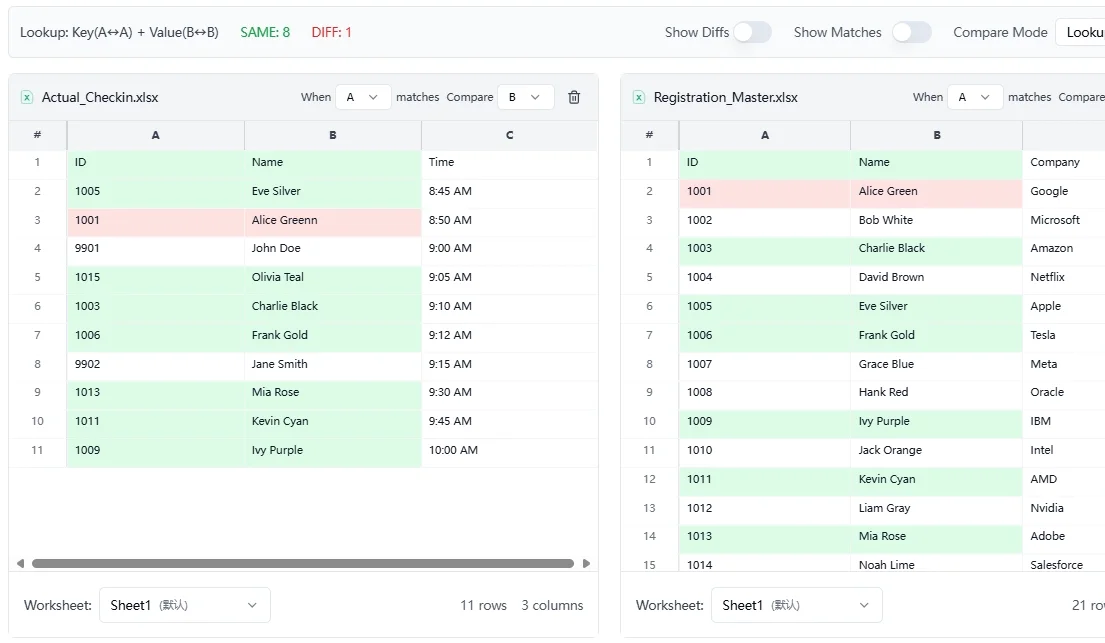
ID-Based Data Reconciliation
Key-Value Matching
Choose your ID column and value column, then compare records across both sheets.
Smart Result Filtering
Filter by full matches, value mismatches, or keys that only exist on either side.
Built for Audits & Validation
Ideal for reconciling financial records, data exports, or any ID-driven dataset.
The Fastest Way to Compare Excel Files
Spot differences instantly without uploading your data.
Free & No Installation
No software to install, no accounts to create. Simply open your browser and start your Excel compare task immediately.
100% Private & Secure
Files are processed locally and never uploaded to servers. Your sensitive business data stays safe on your device while you compare Excel files.
Support for .xlsx, .xls and .csv
Works seamlessly with all major spreadsheet formats. Drag and drop your files to compare Excel data without manual conversion.
Smart Synchronized Scrolling
Keep your view aligned. Both spreadsheets scroll together in lockstep, ensuring you never lose your place during a complex Excel comparison.
Visual Difference Highlighting
Stop squinting at rows. We automatically color-code changes, additions, and deletions, making it effortless to compare Excel sheets visually.
High-Speed Performance
Optimized for large files. Enjoy smooth, lag-free rendering that lets you find differences quickly, no matter the spreadsheet size.
Why Professionals Trust Our Online Excel Compare Tool
See how switching to a visual Excel comparison tool helps teams eliminate human error and save hours every week.
Senior Financial Analyst
I handle massive quarterly reports, and manually checking row by row was a nightmare. This tool lets me compare Excel files instantly with a clear side-by-side view. It catches specific cell value changes I definitely would have missed with just my eyes. A total lifesaver for month-end closes.
Project Manager
Tracking schedule changes between V1 and V2 used to be a mess. As an online Excel compare tool, this is unbeatable. The red and green highlighting makes it obvious exactly what shifted in the timeline. It saves me about three hours of manual cross-referencing every week.
Supply Chain Coordinator
I'm on a Mac, so standard Windows plugins or the 'Inquire' add-in aren't options for me. I needed a way to compare two Excel sheets without installing sketchy software. This runs right in the browser. It's clean, fast, and secure—perfect for checking inventory lists against supplier invoices.
Sales Operations Lead
I'm not technical, so I don't use code-based diff tools. But this visual Excel comparison feels intuitive. It aligns the rows perfectly even when data is slightly sorted differently. It's the easiest way to spot discrepancies in our regional sales data without needing complex formulas.
Freelance Auditor
We deal with client files that are constantly updated without version notes. Doing a manual Excel spreadsheet comparison used to take half a day. Now I upload the old and new files, and boom—every changed price or quantity is highlighted. It significantly reduces the risk of human error in my audits.
HR Administrator
Clients constantly send updated budget files without telling me what changed. I use ExcelCompare to screen every document immediately. It's better than native Excel features because I don't need to open the heavy desktop app just for a quick check. The synchronous scrolling keeps everything aligned perfectly.
Systems Engineer
I use git for code, but my operations team needs to diff Excel files without using command lines. I recommended this tool to them, and they finally stopped asking me to write Python scripts for simple data checks. The UI is friendly enough for anyone to use immediately.
Small Business Owner
The ability to spot differences in Excel at the cell level is critical for my pricing sheets. Other tools just show that the row changed, but this highlights exactly which number is different. That level of granularity is exactly what I need to ensure my quotes are accurate.
Construction Estimator
I tried expensive enterprise software, but this free Excel Compare tool actually handles formatting changes better. It ignores the cosmetic stuff (like bold fonts or colors) and focuses on the actual data values, which is all I care about when reviewing subcontractor bids.
Data Entry Specialist
Finally, a simple online Excel diff that doesn't require a login or a credit card to test. I use it to double-check my work before submitting entries. Being able to see the 'Before' and 'After' vertically locked together makes verifying data corrections incredibly fast.
Marketing Analyst
We often have two versions of customer lists from different sources. This visual Excel comparison tool is key for merging them accurately. It's so much faster than using VLOOKUPs or Power Query just to find mismatches. The browser interface means no installation hassle, which is great for remote teams.
Small Business Accountant
I used to waste so much time trying to reconcile bank statements in Excel. Now, I just upload both statements side-by-side using this Excel Compare feature. The highlighting immediately shows any discrepancies, saving me hours each week. It's the most efficient spreadsheet comparison I've found.
Operations Manager
When comparing updated project plans or inventory logs, manual checks are prone to errors. This online Excel diff tool streamlines the entire process. Seeing the exact changes in parallel, with sync scrolling, means we can catch errors before they impact our operations. It's an essential tool for data accuracy.
E-commerce Manager
Managing product price lists across different platforms can be tricky. I rely on this Excel Compare function to ensure all my spreadsheets match. It's a no-nonsense way to diff Excel files quickly without getting bogged down in technical jargon. The visual highlight is crucial for spotting even minor price adjustments.
Consultant
For client work, I often receive updated data files that need comparison against previous versions. This browser-based Excel compare solution is perfect. It's secure, doesn't require installation, and delivers a crystal-clear view of differences, making my analysis much more effective and faster.
Freelance Writer
When reviewing content drafts or client revisions that involve data tables in Excel, finding specific changes could be tedious. This Excel sheet comparison tool makes it simple. I can quickly identify any altered figures or added/deleted rows. It's an indispensable aid for maintaining data integrity.
HR Manager
We frequently need to compare employee records from different systems or updates. This visual Excel diff helps us identify discrepancies in names, IDs, or status codes instantly. It's much more user-friendly than complex programming solutions for comparing spreadsheets.
Business Analyst
The core functionality of this Excel Compare tool is its ability to show differences clearly. When comparing complex datasets for reporting, this tool cuts down the review time significantly. The side-by-side layout with synchronized scrolling is intuitive, making it easy to compare two Excel files for accuracy.
Frequently Asked Questions about ExcelCompare
Have another question? Contact us at support@excelcompare.org